
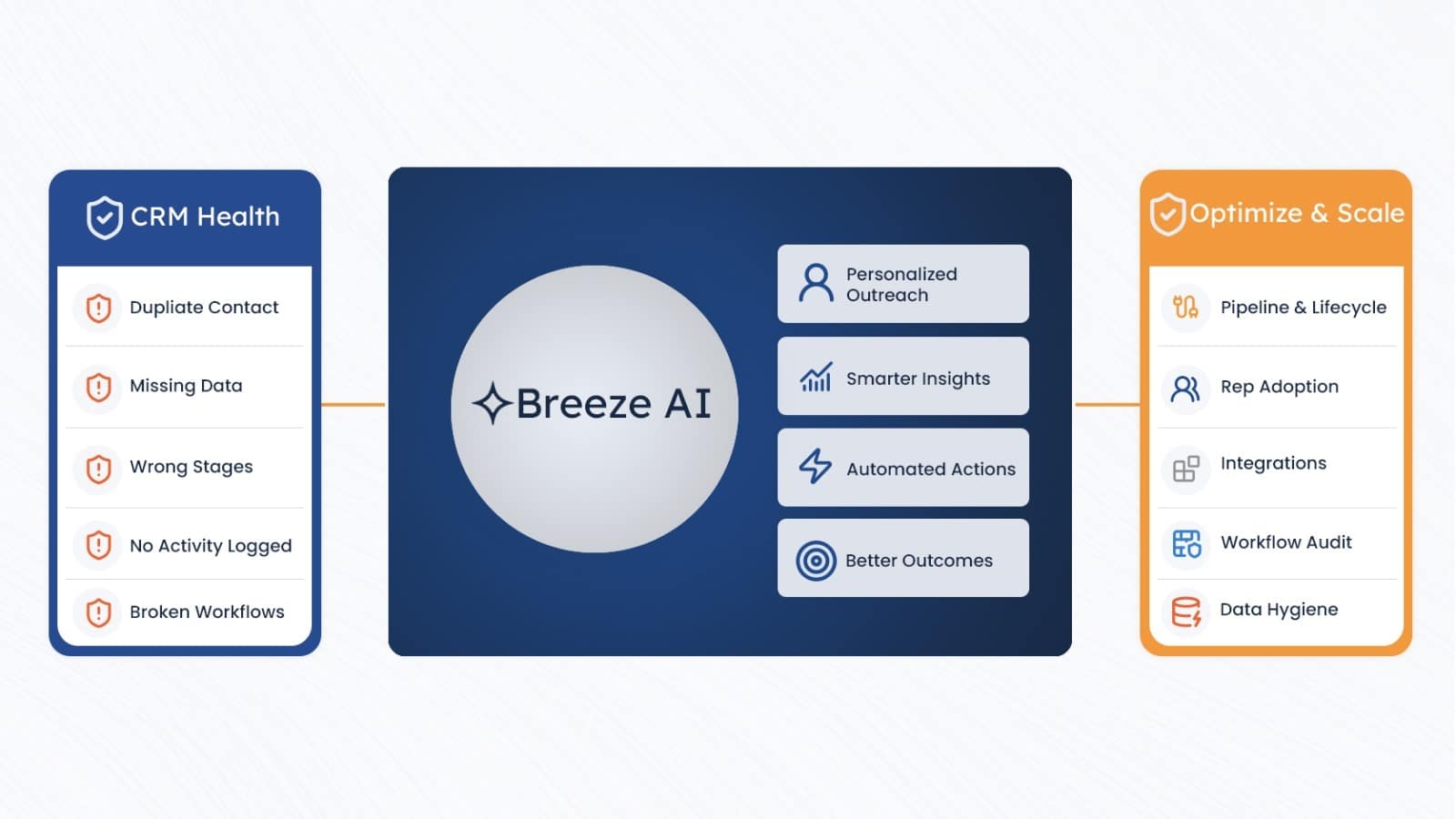
When HubSpot announced Breeze AI, most teams went straight to the feature list — AI agents, content generation, prospect recommendations. The question most skipped: what does your CRM actually look like right now?
Breeze doesn't have judgment. It reads your property values, lifecycle stages, activity logs, and deal data, then acts on them. A contact marked as a decision-maker gets treated like one. A deal stage labeled "Proposal Sent" triggers AI-driven next steps whether a proposal was actually sent or not. The AI assumes the CRM is correct.
If your CRM has been running for a year or more, it likely has duplicate records, vague lifecycle stages, reps who don't log calls, and workflows that were patched twice and nobody remembers what they originally did. None of that stops Breeze from running on it. It just means Breeze runs on bad inputs and produces confident bad outputs automatically.
This guide is not a verdict on whether Breeze is worth using. It is. This is about what needs to be true in your CRM before the AI produces results rather than faster errors.
01 What HubSpot Breeze AI actually does
Breeze is HubSpot's AI layer, not a standalone add-on, but a system built into every Hub. It runs across four areas that matter most for this conversation: Every one of these components reads from your CRM.
Breeze Copilot summarizes contact history your reps logged, or didn't. Breeze Agents write outreach based on property values entered last year, or imported from a spreadsheet, or left blank. Breeze Intelligence enriches records that may or may not be duplicates. The AI has no way to assess data quality. It assumes the CRM is right.
02 HubSpot's outcome-based pricing: what it changes for your team
Most AI tools charge for access: seats, API calls, usage tiers, billed whether the AI helps or not. HubSpot took a different approach with Breeze Agents. They charge per completed outcome.
On paper, that's a fairer deal than paying for a seat whether the AI performs or not. In practice, it adds a cost variable tied directly to how clean your CRM is.
A "resolved support conversation" costs $0.50. But if ticket properties are missing customer context and the AI misroutes to the wrong team, requiring a human to step in, that may still register as a resolution attempt. And Breeze Intelligence charges credits per record: enriching a duplicate wastes budget on a record that should have been merged before the AI ever touched it.
"HubSpot is tying AI cost directly to operational performance. That makes RevOps and MOps more important, not less. AI performance depends on the operational structure underneath it."
The pricing model is fair. A messy CRM turns a fair model into a leaky budget.
03 Why AI fails on a dirty CRM — and why it fails without warning
The problem with bad AI output is that it often looks correct. A Breeze-drafted prospecting email reads well. The AI sounded confident about the job title and company, because those fields had values. It doesn't matter that the values came from a 2021 import and the contact moved to a different company in 2023. You don't get an error message. You get a polished, personalized, wrong email, sent automatically, at scale.
Duplicate contacts: Breeze Intelligence enriches both records. You pay credits twice. The contact's activity history splits across two records, so AI summaries are incomplete on both. Undefined lifecycle stages: Breeze can't predict deal outcomes when "Proposal Sent" means four different things to four different reps. The AI averages across the noise.
Reps not logging activity: Breeze Copilot builds meeting prep summaries from logged calls and emails. If 40% of calls aren't logged, every summary is built from 60% of the actual story. Broken workflow logic: Breeze Agents interact with existing workflows. If your workflows have conflicting enrollment criteria, AI compounds the problem on a schedule.
04 Data hygiene — the prerequisite everything else depends on
Every other fix in this guide assumes your data is clean. Standardized pipeline stages don't help if the records in those stages are wrong. Connecting your ERP just syncs bad data faster. Start here.
Breeze Intelligence credits are not free. Deduplicate and standardize records before enrichment so credits are spent on high-value contacts rather than duplicate records.
Most HubSpot Instances Have More Duplicates Than Anyone Wants to Acknowledge
- Go to Contacts → Actions → Manage Duplicates. HubSpot flags likely matches by email, name, and company. Work through this queue before enabling Breeze.
- Breeze Intelligence has a deduplication feature for bulk-merging flagged matches. Use this before spending enrichment credits, as enriching a duplicate wastes budget on a record that should not exist.
- After the automated pass, export contacts and filter for shared email domains or phone numbers the tool missed. Manual review catches what automation skips.
- Set up duplicate prevention going forward: enable HubSpot's duplicate blocking on forms and configure API import rules to match on email before creating new records.
Filters and AI Segmentation Break When the Same Value Appears 12 Different Ways
- Country: Pick one format and bulk-update everything else. "US," "USA," and "United States" are three distinct values to any filter or AI segmentation rule.
- Phone Numbers: Strip inconsistent formatting, parentheses, dashes, spaces, and country code variations, and standardize to E.164 format (+15551234567). Do this via workflow action or a one-time API update.
- Job Titles: Convert the job title field from free text to a dropdown with a defined taxonomy. "VP of Marketing", "VP Marketing", and "Vice President, Marketing" land in different AI segments.
- Company Names: Run a bulk review for abbreviations, legal suffixes (Inc., LLC, Ltd.), and inconsistent ampersand versus "and" usage. This matters for deduplication and AI company-level matching.
Breeze Intelligence Credits Are Not Free. Spend Them on the Records That Matter.
Enriching duplicate records wastes credits and gives AI conflicting information to work from.
- Define the minimum property set for an AI-ready contact: industry, company size, annual revenue, job title, and location. Any contact missing more than three of these should be enriched or removed before AI touches it.
- Segment by data completeness before running enrichment. Prioritize records in active deals, enrolled sequences, or matching your ICP. Enriching cold, unengaged contacts first wastes credits on records the AI won't use well anyway.
- Spot-check enrichment output on a sample of 50–100 records before trusting it at scale. Breeze Intelligence pulls from third-party sources, so job titles and revenue figures should be verified before they feed AI outreach.
Clean Data Decays. Governance Is What Keeps It Clean After the Sprint Ends.
- Assign one data steward: one person accountable for CRM data quality, not a committee. This sits within RevOps or MOps in most B2B organizations.
- Restrict editing permissions on critical fields. Not every rep should be able to overwrite lifecycle stage, company name, or deal owner. Lock these to admins or use approval workflows.
- Build a workflow that flags new records missing required fields within 24 hours of creation. Route the flag to the record owner — not to a shared inbox where it gets ignored.
- Schedule a monthly review using the Data Quality command center in Operations Hub. It surfaces missing properties, format issues, and integration errors without a full manual audit.
05 Pipeline and Lifecycle Stage Definitions — What AI Uses to Predict Everything
Breeze uses lifecycle stages and deal stages to score leads, predict outcomes, and decide when to trigger agent actions. If those stages are loosely defined or mean different things to different reps, every AI prediction is built on noise.
This shows up in almost every HubSpot audit we run. The stages exist. Nobody agreed on what they mean.
Write a Binary Test for Each Stage — Not a Description
A contact should be in MQL if and only if a specific condition is true. If you can't write that test, the stage is not defined yet.
If two reps can look at the same contact and disagree on its lifecycle stage, Breeze is learning from inconsistent data.
Enforce Required Fields at Stage Transitions
HubSpot lets you block deal stage movement until required fields are completed. Turn this on. Reps complain for two weeks and then it becomes the standard. The AI receives consistent, structured data at every stage transition.
- Deal value required before moving to Proposal Sent
- Estimated close date required before moving to Decision Stage
- Decision-maker contact role required before moving to Contract Review
- Lost reason selected from a dropdown before moving to Closed Lost — no freeform text field
Review Your Data Model Before AI Maps Relationships
Go to Settings → Data Management → Data Model. This view shows how contacts, companies, deals, and tickets relate within your HubSpot instance.
If a contact isn't associated with a company record, Breeze Copilot generates summaries without company context. If deals aren't linked to the right contacts, AI forecasting builds predictions using incomplete or orphaned records.
Fix associations on your top 20% of active contacts and deals before enabling Breeze. Clean the remaining records in batches over the weeks that follow.
06 Rep Adoption — The Problem AI Cannot Solve
Breeze AI cannot analyze calls that weren't logged. It cannot learn from meetings that weren't recorded. It cannot spot patterns in emails sent from a personal Gmail account that was never connected to HubSpot.
If your reps log 50% of their actual activity in HubSpot, Breeze is working from 50% of reality. The AI has no warning label for this. It builds forecasts, generates summaries, and drafts follow-ups based on what's there, and what's there is incomplete.
Breeze can only learn from the activities that exist in HubSpot. Missing activity creates incomplete summaries, inaccurate forecasts, and weaker AI recommendations.
Automate Logging So Reps Don't Have to Choose
Connect HubSpot's Gmail or Outlook integration so emails log to the contact timeline automatically. Enable calendar sync so meetings appear as activities without the rep doing anything. If your team uses a dialer, Aircall, JustCall, or HubSpot Calling, make sure recordings and call outcomes log to the contact record automatically.
The goal is to make manual logging the exception, not the default.
- Email integration connected for every active rep, not just the ones who configured it themselves
- Calendar sync enabled and confirmed working for meetings Breeze will summarize
- Dialer connected and logging call dispositions to the contact record
- Adoption rate measured and baselined — percentage of reps with at least one logged activity per week in the past 30 days
Remove friction wherever possible. The less manual effort required to maintain CRM activity, the more complete and reliable the data available to Breeze.
Train on What's In It for the Rep — Not on How to Click Buttons
Adoption training that walks through feature menus doesn't stick. Reps adopt tools when the output benefits them directly.
The pitch is simple: when activity is logged consistently, Breeze generates meeting prep summaries before every call, flags at-risk deals before the quarter ends, and suggests next steps based on what worked in similar deals.
Less prep work. Less administrative effort. Better visibility.
Reps who don't log activity don't get the AI benefits. That framing is usually more effective than a mandate.
07 System Integrations — Broken Connections Give AI an Incomplete Customer Picture
Breeze performs best with a complete view of each customer: marketing engagement history, sales interactions, support tickets, billing status, and product usage.
If your billing data lives in an ERP that hasn't synced correctly in three months, the AI makes decisions without some of your most commercially relevant signals.
A broken integration is often worse than no integration. It can write incomplete or incorrect data into your CRM, and Breeze has no way of knowing the information is wrong.
Audit Every Active Integration Before Enabling Breeze
Before enabling Breeze, review each active integration and answer three questions:
- Is the integration syncing bidirectionally, or only one way?
- Are field mappings still accurate after recent HubSpot property changes?
- Are there sync errors in the integration logs that have been silently failing for weeks?
AI is only as reliable as the systems feeding data into HubSpot. A complete customer picture requires every critical integration to be functioning correctly.
Review Integration Logs for Hidden Failures
Navigate to:
Settings → Integrations → Connected Apps → [App Name] → Logs
Review sync history and error logs for every business-critical integration.
- Investigate sync failures that have remained unresolved for more than 14 days
- Validate that field mappings still match current HubSpot properties
- Confirm updates flow correctly between connected systems
- Verify that revenue, billing, subscription, and customer status fields are updating as expected
Fix integration issues before Breeze relies on the data they are supposed to provide. AI recommendations built on incomplete data are difficult to identify and even harder to trust.
Why Integration Quality Matters to AI
Breeze reads CRM properties when it builds outreach, scores contacts, generates customer summaries, and supports forecasting decisions.
If integrations are writing empty values, outdated information, or incorrect customer data, those errors become part of the AI's decision-making process.
Breeze needs a complete and accurate customer record. The more reliable your integrations, the more reliable the AI outputs built on top of them.
08 Workflow Audit — Clean Up Before AI Interacts with Your Automation
Breeze Agents can trigger workflows and interact with automation logic. If your existing workflows have conflicting enrollment criteria, loops from old fixes, or campaign sequences that were meant to be temporary but never got turned off, AI actions compound those problems at speed.
Most HubSpot instances running for two years or more have at least a few: a workflow built for a 2022 campaign that's still active, two workflows setting the same property to different values, or a contact enrolled in seven simultaneous sequences with no clear reason.
AI does not fix broken automation. It accelerates it. Clean workflow logic before allowing Breeze to interact with your automation ecosystem.
Audit Every Active Workflow
Start by reviewing every active workflow in your HubSpot portal. Every workflow should have a clear purpose, a documented owner, and a measurable outcome.
- Export the full list of active workflows. Every active workflow needs a documented purpose and owner. If nobody can explain what it does, turn it off.
- Find any contact enrolled in more than five simultaneous workflows. This is usually a sign of overlapping triggers and automation conflicts.
- Look for workflows setting the same property in opposite directions based on similar triggers. These workflows cancel each other out and generate noise in the contact timeline.
If multiple workflows can update the same property, document which workflow should be the source of truth and remove competing automation where possible.
Review Workflow Performance and Error Rates
Open the Performance tab for each workflow and review historical execution data before enabling Breeze.
- Check the error rate on each workflow. Any workflow with an error rate above 3% should be fixed before Breeze can interact with it.
- Investigate enrollment failures, property update errors, and integration-related workflow failures.
- Verify that workflow goals and outcomes still align with current business processes.
A workflow that fails 3% of the time becomes significantly more problematic when AI-driven actions increase the volume of automation running through it.
Archive Legacy Automation and Document What Remains
Many mature HubSpot portals contain automation built for campaigns, tests, or initiatives that ended months or years ago. Leaving these workflows active creates unnecessary complexity and increases the likelihood of AI interacting with outdated logic.
- Archive any workflow built for a one-time campaign or test that ran more than 90 days ago.
- Remove duplicate workflows performing the same function.
- Document the intended goal, trigger criteria, and owner for every workflow that remains active.
- Review workflow documentation regularly to ensure automation continues to reflect current business processes.
You need to know what every workflow is supposed to do before you can recognize when AI is helping, interfering, or amplifying an existing problem.
09 6-Week CRM Readiness Sprint
This sprint is designed for one RevOps or MOps professional with part-time HubSpot admin support. Each phase builds on the previous one, so complete the work in sequence.
Don't start Phase 2 before Phase 1 is complete. Enriching records that haven't been deduplicated wastes credits on records that should be merged first.
Phase 1: Audit and Baseline
Start by understanding the current state of your CRM, data quality, workflows, integrations, and user adoption.
- Export the full contact and company database and run email validation using a tool such as NeverBounce or ZeroBounce.
- Run HubSpot's Duplicate Management tool and document the number of duplicates identified. Do not merge records yet.
- Export all active workflows and document each workflow's trigger, objective, and owner.
- Document what each lifecycle stage currently means in practice, not what was originally intended, but how users actually apply it today.
- Review integration logs and identify any sync failures that have remained unresolved for more than 14 days.
- Measure rep adoption by reviewing activity reports from the past 30 days and calculating the percentage of reps with at least one logged activity per week.
Establish a clear baseline before making changes. You can't improve what hasn't been measured.
Phase 2: Clean and Standardize
Once the audit is complete, begin correcting data quality issues and establishing consistent CRM definitions.
- Merge duplicate records, starting with contacts and then companies. Use Breeze Intelligence or HubSpot's native deduplication tools.
- Standardize country, phone number, and job title fields through bulk imports or workflows.
- Finalize lifecycle stage definitions and obtain written sign-off from both sales and marketing teams.
- Enable required fields for pipeline stage transitions.
- Resolve the three highest-impact integration sync errors identified during the audit.
- Archive inactive, redundant, or conflicting workflows.
Clean data and consistent processes create the foundation Breeze needs to generate reliable outputs.
Phase 3: Governance and AI Readiness
With data and processes stabilized, implement the controls required to maintain CRM quality and prepare for AI adoption.
- Enable email and calendar auto-logging for every active rep and verify functionality individually.
- Configure the Data Quality Command Center in Operations Hub and establish weekly monitoring alerts.
- Build a workflow that flags records missing required fields within 24 hours and routes the notification to the record owner.
- Assign a formal data steward with clear ownership, responsibilities, and a recurring monthly review cadence.
- Run Breeze Intelligence enrichment only on ICP-matched, deduplicated, and validated records.
- Establish minimum readiness thresholds before enabling Breeze.
Duplicate rate below 3%, required fields populated on at least 80% of active records, and rep adoption above 80%.
10 Pre-Launch Checklist — 25 Things to Verify
Before enabling Breeze, verify that your CRM meets a minimum standard for data quality, process consistency, adoption, and system reliability. The items below represent the most common issues that undermine AI performance after launch.
AI doesn't create CRM problems — it amplifies the ones that already exist. Use this checklist to validate that your foundation is ready.
Data Quality
- Duplicate contact rate below 5% of the total database
- Email addresses validated — bouncing addresses removed or suppressed
- Country and phone fields use a single, consistent format across all records
- Job title field uses a controlled dropdown taxonomy instead of free text
- Enrichment fields (industry, company size, annual revenue) populated on at least 70% of active records
Pipeline and Lifecycle Stages
- Each lifecycle stage has a documented binary definition agreed upon by both sales and marketing
- Required fields enforced at every deal stage transition
- Data Model Builder reviewed and all contact, company, deal, and ticket associations verified
- Lead scoring model reviewed and calibrated within the last 90 days
- No open deals older than six months without activity — stale opportunities have been closed or archived
If lifecycle stages mean different things to different teams, every prediction, score, and recommendation generated by Breeze becomes less reliable.
Workflows
- Every active workflow has a documented purpose, business goal, and named owner
- Error rate below 3% across all active workflows
- No contact enrolled in more than five simultaneous workflows
- Conflicting workflows updating the same property in opposite directions have been identified and resolved
- Inactive, temporary, and one-time campaign workflows archived
AI interacting with outdated or conflicting automation can create problems at scale much faster than a human user ever could.
Rep Adoption and Activity Logging
- Email and calendar auto-logging confirmed for every active rep
- Adoption rate above 80%, measured as the percentage of reps with at least one logged activity per week
- Dialer connected and automatically logging call outcomes to contact records
- No reps submitting blank or single-word call notes — "spoke" without context provides little value to AI analysis
Breeze can only learn from the activities recorded in HubSpot. Unlogged activity is invisible to AI.
Integrations
- Integration error logs reviewed — no unresolved sync failures older than 14 days
- Field mappings verified after any recent HubSpot property changes
- Bidirectional sync tested and confirmed between HubSpot and connected systems
- ERP or billing system connected and syncing revenue and subscription data accurately
- Data governance owner assigned and recurring monthly review scheduled
A successful Breeze rollout depends on trustworthy data flowing consistently across your CRM, integrations, and automation ecosystem.
11 What Breeze Delivers on a Clean Foundation
All of the work outlined in this guide leads to one outcome: AI that performs the way HubSpot intended it to.
When your data is clean, processes are clearly defined, activity logging is consistent, and integrations are syncing reliably, Breeze finally has something accurate to work with. Instead of compensating for missing context and conflicting information, it can focus on generating insights, recommendations, and automation that reflect the reality of your business.
Better data doesn't just improve AI performance — it improves every decision built on top of your CRM.
The Work Doesn't Feel Like AI Work
Deduplicating 40,000 contacts. Converting a job title field into a controlled dropdown. Enforcing required fields before a deal can move stages. None of these tasks feel particularly innovative or exciting.
But they are AI work.
These foundational improvements determine whether every dollar spent on Breeze generates measurable value or simply funds faster, more polished mistakes. AI can only perform at the level of the data and processes that support it.
AI does not eliminate operational problems. It scales whatever already exists — good or bad.
The Foundation Creates Value Regardless
One of the most important observations from CRM optimization projects is that the improvements remain valuable even before AI enters the picture.
- Reports become more accurate and trustworthy.
- Sales and marketing teams operate from the same definitions and data.
- Forecasts reflect reality rather than assumptions.
- Reps trust the CRM and use it more consistently.
- Leadership spends less time reconciling data and more time making decisions.
Breeze doesn't create these outcomes. The foundation does.
A well-governed HubSpot instance performs better with or without Breeze enabled. AI simply increases the return on a foundation that already works.
Not sure where your CRM stands?
Digital DI Consultants runs HubSpot CRM audits that produce a specific, prioritized fix list before Breeze goes live — data issues, workflow conflicts, integration errors, adoption gaps. No generic report. What's broken in your instance.
Talk to Our Team →